GitOps Fundamentals
What You’ll Build
During this series, you will build a complete GitOps workflow with automated deployments, progressive delivery, and canary rollouts - all running locally on minikube for free.
What You’ll Learn:
- ArgoCD for GitOps deployments
- Kargo for environment promotion
- Argo Rollouts for canary deployments
- Complete CI/CD with GitHub Actions
- Production-grade release engineering
Tip
No Kubernetes experience required - we explain concepts as we go.
Why GitOps?
Before diving into tools and implementation, let’s understand the problem GitOps solves and why it matters for modern software delivery.
The Traditional Deployment Problem
In traditional CI/CD workflows, your pipeline directly pushes changes to Kubernetes:
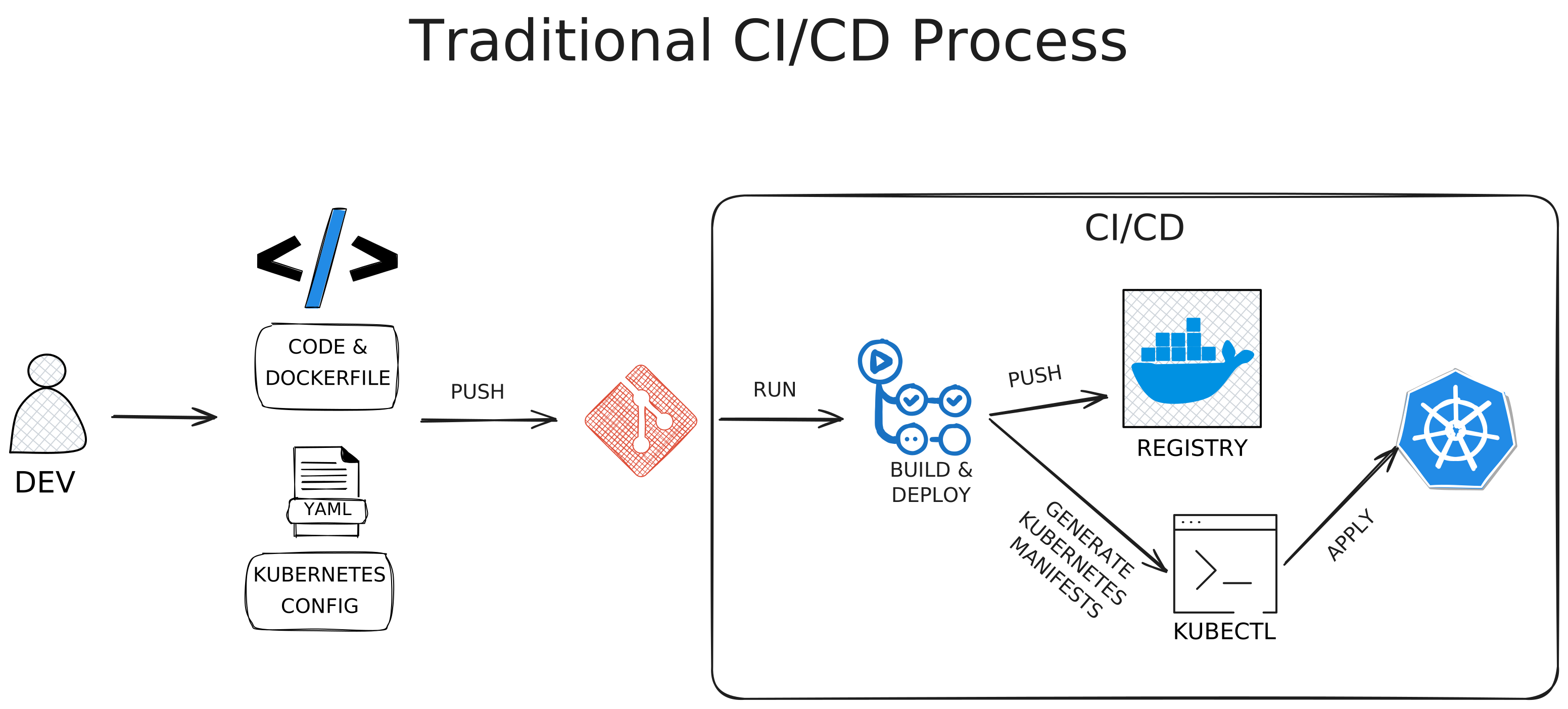
This approach creates several problems:
- No single source of truth - The cluster state exists only in the cluster itself
- Manual intervention required - Every change needs someone to run commands
- No audit trail - Who changed what, when, and why?
- State drift - The actual cluster state can drift from your intended configuration
- Difficult rollbacks - Which version was running before? What changed?
- Hard to answer “What’s running right now?” - You have to query the cluster to know
Imagine a production incident where someone deployed the wrong version, you need to rollback immediately, but you don’t remember which version was running before or what configuration was in place—and there’s no record of who made the change or why.
This is deployment chaos.
The GitOps Solution
GitOps flips this model by making Git the single source of truth and using a pull-based deployment model:
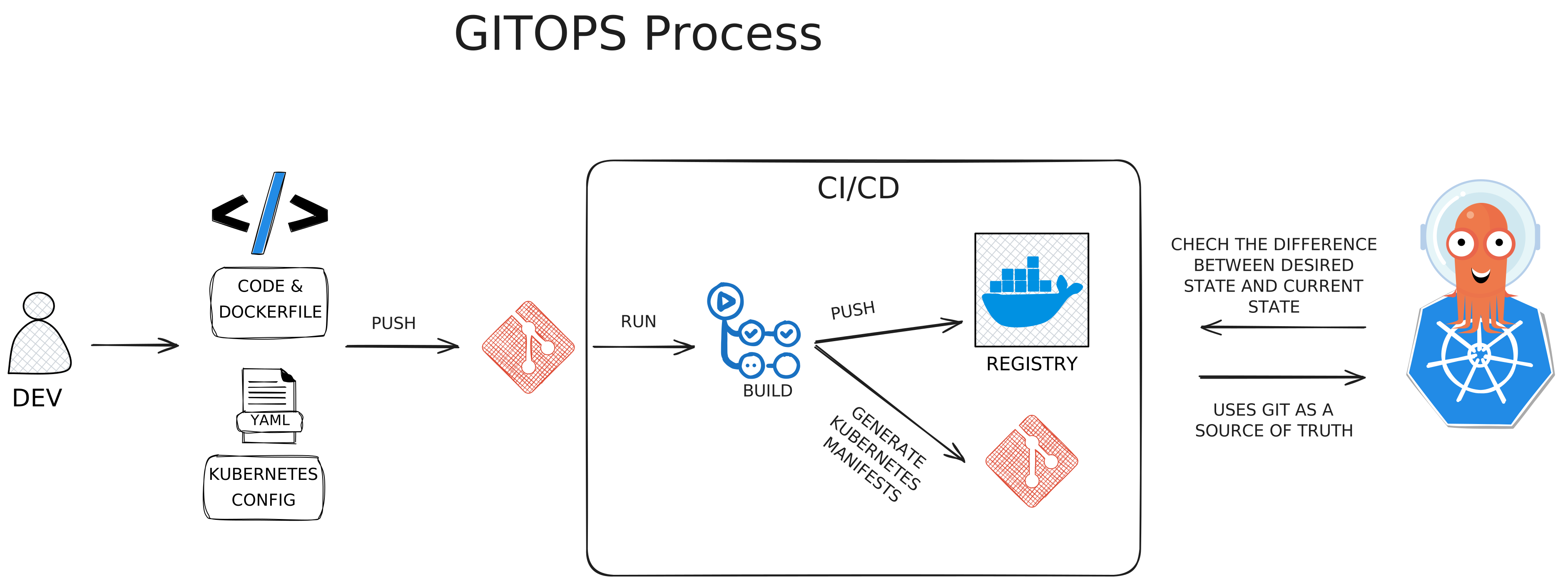
Core Principles:
- Declarative Configuration - You declare what you want (the desired state), not how to achieve it
- Git as Source of Truth - All desired state is stored in Git repositories
- Automated Reconciliation - A GitOps operator continuously syncs the cluster to match Git
- Self-Healing - If something changes in the cluster that doesn’t match Git, it’s automatically corrected
Key Difference: Instead of CI/CD pushing to the cluster, a GitOps operator pulls from Git and continuously ensures the cluster matches what’s declared in Git.
Benefits:
- ✅ Complete audit trail - Every change is a Git commit with author, timestamp, and reason
- ✅ Easy rollbacks - Just revert the Git commit or point to a previous tag
- ✅ Single source of truth - Git always reflects what should be running
- ✅ No manual intervention - Deployments happen automatically when Git changes
- ✅ Disaster recovery - Rebuild your entire cluster from Git
- ✅ Clear answer to “What’s running?” - Look at Git, not the cluster
The Complete GitOps Workflow
Here’s the complete workflow we’ll build in this series, using Kargo for progressive delivery:
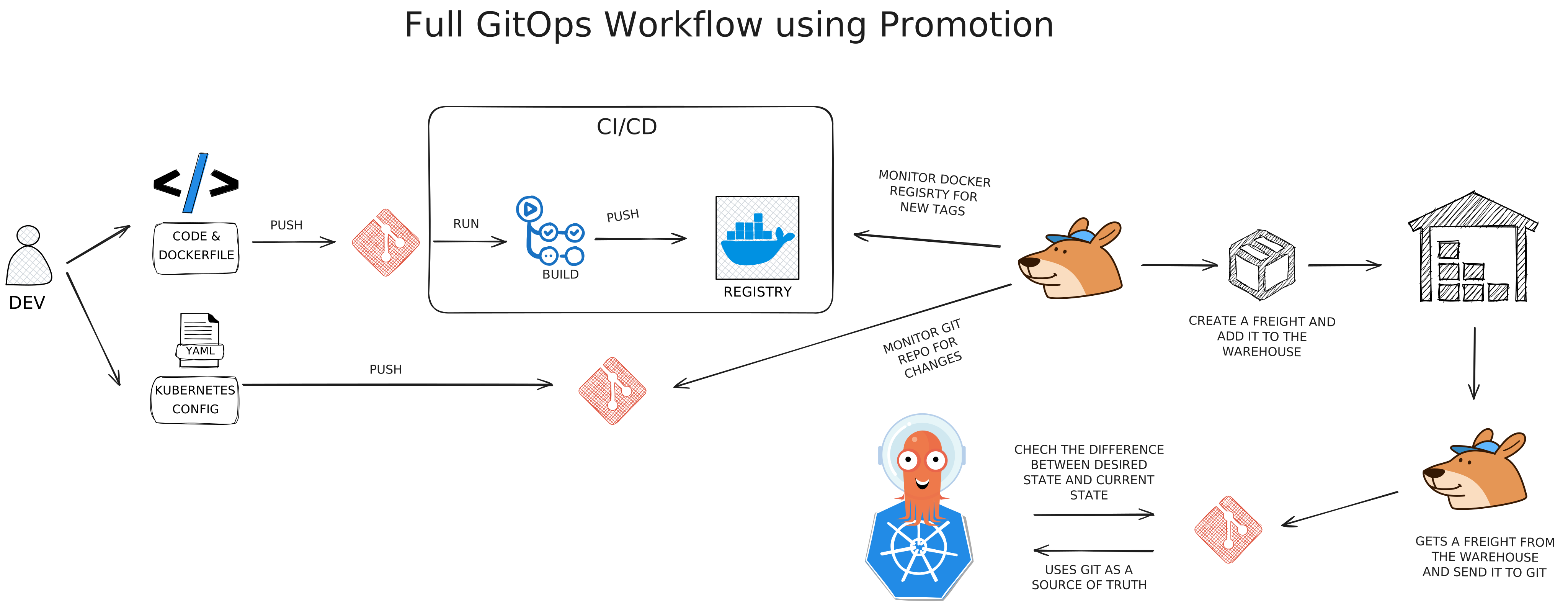
How It Works
- Developer workflow - Write code, push to Git
- CI/CD builds - GitHub Actions builds and pushes container image to registry
- Kargo detects new version - Monitors registry for new image tags
- Progressive delivery - Kargo creates “freights” (versioned artifacts) and promotes them through environments
- ArgoCD deploys - Watches Git for changes made by Kargo and syncs to cluster
- Continuous monitoring - Each environment is verified before promotion to the next
What Makes This Different
Traditional CI/CD:
- CI builds and tests
- CD pushes directly to cluster
- Manual intervention for rollbacks
- State lives in the cluster
GitOps with Kargo:
- CI builds and tests
- Kargo manages promotion between environments
- ArgoCD pulls changes from Git
- Automatic reconciliation and self-healing
- State lives in Git
What You’ll Build in This Series
Part 1: Local Kubernetes Setup & First GitOps Deployment
- Set up minikube on your laptop
- Install ArgoCD
- Deploy your first application via GitOps
- Experience self-healing in action
What you’ll learn: The basics of GitOps and how ArgoCD maintains desired state
Part 2: Multi-Environment Management
- Create dev, staging, and production environments
- Use Kustomize for environment-specific configurations
- Manage different configurations for each environment
- Implement promotion workflows
What you’ll learn: How to manage multiple environments with GitOps
Part 3: Progressive Delivery with Kargo
- Install Kargo for automated environment promotion
- Set up verification gates between environments
- Configure approval workflows
- Automate the path from dev to production
What you’ll learn: Advanced deployment strategies and progressive delivery
Part 4: Complete CI/CD Workflow
- Set up GitHub Actions for automated builds
- Integrate with ArgoCD for deployments
- Implement Argo Rollouts for canary deployments
- Build the complete workflow from PR to production
What you’ll learn: How to tie everything together into a fully automated GitOps pipeline
Resources
Part 1: Local Kubernetes Setup & First GitOps Deployment
Kubernetes Cluster Setup Before we can explore GitOps, we need a Kubernetes cluster to work with. While cloud providers offer managed Kubernetes services, they cost money and add unnecessary complexity when learning. Instead, we’ll use minikube - a tool that runs a complete Kubernetes cluster on your laptop, completely free. By the end of this tutorial, you’ll have: A working local Kubernetes cluster All necessary tools installed and configured A test application running to verify everything works GitHub repository ready ArgoCD installed and ready to deploy This foundation enables you to learn production-grade GitOps patterns without infrastructure costs or complexity. Everything you learn here applies directly to production Kubernetes clusters. ...